Energy Recovery Ventilator (ERV) FAQs & Troubleshooting Guide

 RenewAire’s FAQ page delivers technical guidance and support for both residential and commercial products. This guide covers critical product specifications, installation best practices, and long-term maintenance.

Explore key solutions for:

  • Visit our Residential ERV Series page to filter units by CFM range and find the perfect match for your home’s square footage and application.

  • Maintenance & Care: Learn how to properly service ERV cores and filters to ensure peak indoor air quality (IAQ) and system longevity.

  • Operational Settings: Find the appropriate configurations for continuous ventilation and percentage timer settings (PTL/FM) to maximize energy efficiency.

Advanced Technical Support

For deeper technical dives—including BMS integration, BACnet MSTP, or specific controller troubleshooting—please browse our categorized sections below.

If you require advanced assistance, our Technical Sales Support team is available to help. Our HVAC experts specialize in energy recovery ventilation and can provide expert troubleshooting for complex product issues or system designs.

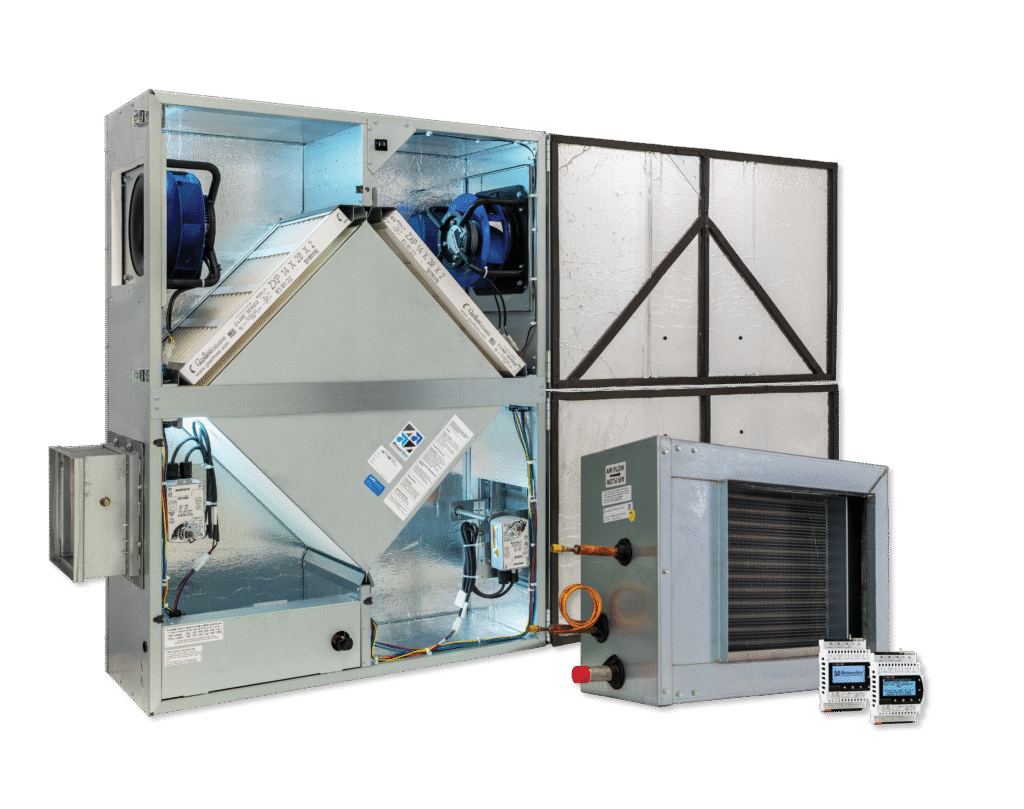
RenewAire has a wide product line that features items like energy recovery ventilators (ERVs), dedicated outdoor air systems (DOAS), dampers, integrated programmable controls, and heaters.

Residential ERV Questions

To determine the best model for your home, first use our Home Ventilation Calculator. Additionally, if you are calculating for bathroom exhaust, we recommend 80 CFM for each full bath and 50 CFM for each half bath. However, you should always verify requirements with local building codes, as regulations vary by area.

To determine your home’s minimum ventilation needs, you should refer to the ASHRAE 62.2 standard, titled Ventilation and Acceptable Indoor Air Quality in Residential Buildings. Specifically, this standard helps evaluate the relationship between indoor air quality and occupant health. While energy recovery ventilators (ERVs) primarily function to reduce HVAC energy costs, they also maintain comfort and health by meeting these ventilation requirements.

You can calculate the minimum required ventilation for your home using the following formula:

SQUARE FEET <500′ 501′-1000′ 1001′-1500′ 1501′-2000′ 2001′-2500′ 2501’–3000′ 3001’–3500′ 3501’–4000′
1 BEDROOM 30 45 60 75 90 105 120 135
2 BEDROOMS 38 53 68 83 98 113 128 143
3 BEDROOMS 45 60 75 90 105 120 135 150
4 BEDROOMS 53 68 83 98 113 128 143 158
5 BEDROOMS 60 75 90 105 120 135 150 165

* Infiltration credit not considered, please contact RenewAire to assist in selecting a unit that is best suited for your home.

Because our residential ERVs feature internal insulation, you can install them in almost any indoor location, including closets, basements, unconditioned crawl spaces, or attics. However, you must not install these units where they face direct exposure to outdoor elements. Specifically, ensure the installation site remains protected from rain, snow, and extreme weather to maintain the unit’s integrity.

For detailed installation requirements, please consult our specific product documentation. You can access and download full installation and operation guides by visiting our Resource Library for Product Manuals. These manuals provide the exact clearances and mounting instructions needed for every RenewAire model.

First step is to determine what CFM is recommended for your home. Use our Home Ventilation Calculator.

For EV90-300 units, take the CFM provided by the calculator and divide it by the number in the model number, and then multiply by 100. This is a good base value to keep your percentage time set to year-round. When more ventilation is desired, feel free to increase that value.

Example: For a home with 2400 square feet, 3 bedrooms and an EV130 installed, the calculator says 102 CFM is recommended for the space. (102/130)*100 = 78.46%. So, it’s recommended to set the
percentage timer to 80%.

Most of our residential duct adaptors are designed for either 6” or 8” ducts. Short duct runs (up to 25’) should work well with 6” while longer runs or higher CFMs should use 8”. Guidance can be found in the owner’s manual. When in doubt, check with your local HVAC professional.

In the electrical box, your unit has:

  • a green control board. Make sure the yellow VAR wire is connected to the black COM wire.
  • one 10 pin grey terminal block. Make sure there is a connection between terminals 3 and 4 when variable speed desired.
  • two 8 pin grey terminal blocks. On the terminal block that has the blue factory wire on terminal 1, make sure there is connection between terminals 2 and 3 when variable speed is desired.

If your unit has a Carel controller, please call RenewAire at (608) 221-4499.

To maintain peak indoor air quality (IAQ), you should replace your filters regularly. Specifically, homeowners can purchase genuine RenewAire filters through a local HVAC contractor or directly from authorized online retailers. For example, you can order replacements from the following sites:

• Positive-energy.com
• ERVDirect.com

The frost controller employs a setpoint (St1) and differential (P1) for cycling the supply fan for frost control.  The relationship is shown in the following figure, where the frost control begins as the temperature falls below the setpoint minus differential, and turns back off at setpoint.  The differential P1 is defaulted to 2 but can be increased to minimize cycling.

Commercial ERV Questions

RenewAire energy recovery ventilators (ERVs) integrate with Mitsubishi VRF systems using I/O connections to the Premium controls expansion module to provide ASHRAE 62.1 compliant ventilation.

To complete the integration, follow these three primary connection steps:

  1. Remote On/Off: Connect the Mitsubishi indoor unit (CN151 or CN51) to the RenewAire unit’s digital input to enable synchronized operation.

  2. Speed Control: Use a 0-10V signal from the Mitsubishi controller to the RenewAire Premium expansion module to modulate fan speeds based on occupancy or CO2 levels.

  3. Fault Monitoring: Wire the RenewAire fault relay to the Mitsubishi system’s digital input to ensure the VRF system can respond if the ventilation unit stops.

Learn more in our Mitsubishi VRF Application Guide.

To troubleshoot an offline RenewAire c.pCOe controller, first verify that the expansion module has power and the correct dip switch configuration. An offline status is typically caused by a configuration mismatch, wiring error, or hardware failure. Follow these specific steps to restore connectivity:

  1. Check Control Settings (Premium vs. Enhanced): If your RenewAire unit does not have an expansion module, ensure the control setting is set to “Enhanced.” If an expansion module is present, the setting must be “Premium.”

  2. Verify Dip Switch Positions: The eight dip switches on the c.pCOe must be set in this exact sequence: Forward, Back, Forward, Back, Forward, Forward, Forward, Forward.

  3. Inspect Wiring (J4 and J6): Verify all J4 and J6 connections are secure. Test for continuity between the positive and negative terminals to rule out a short or break in the communication line.

  4. Identify Hardware Failure: Look through the controller casing for a solid red light. A red light confirms the expansion module has failed and requires replacement. If no red light is visible but the unit remains offline, contact RenewAire Support.


Learn how to connect to your Carel controller via Ethernet with this step-by-step guide. You may need to connect via Ethernet to access the display more easily through your laptop, perform an upgrade to the application version, or add a BACnet license. For text instructions, please scroll past the video:

How to Find Your IP Address:

Click the back arrow on your Carel controller, go down to general settings, then go down to the third screen. This is where you will find your IP and MASK addresses.

How to Connect to the Controller:

  1. Go to the “Control Panel” of your computer
  2. Select “Network and Internet”
  3. Select “Network Sharing Center”
  4. Select “Change Adapter Settings”
  5. Double-click “Ethernet”
  6. Select “Properties”
  7. You may have to enter a passcode
  8. Select “Internet Protocol version 4”
  9. Select “Properties”
  10. This is where you will set your IP and subnet
  11. Select “Use the Following IP Address”
  12. The first three octets in the IP address should be set to the same as the first three shown on your controller. In our case, 10.10.1. The fourth octet needs to be unique. For the subnet, all four octets should match the MASK address.
  13. Select “OK,” and then “Close,” and “Close” again
  14. Open a web browser and enter the IP address of the controller
  15. Select “RUT”
  16. From here you will be able to make adjustments and changes that will show up inside the controller as well

If you have additional questions, please contact RenewAire Support

Note: In control versions 3.x and higher this can be done in the general settings menu.

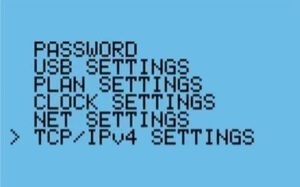
Press and hold the Alarm and Enter buttons on the Carel controller to bring up the hidden menu. The second option should be Settings. If not, press Escape once. Go to settings and then TCP/IPv4 Settings. Set the IP address and then cycle power to the unit.
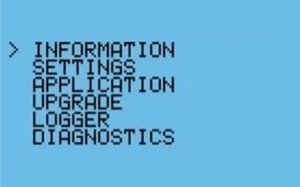

1. Hold down the alarm and enter to view this screen: To get the IP Address to stay in the Carel control, complete steps 1-4. Step 1: hold down alarm + enter to view this screen.
 
2. Move the arrow down to Settings: 
To get the IP Address to stay in the Carel control, complete steps 1-4. Step 2: Scroll down to the "Settings" header and select it.
 
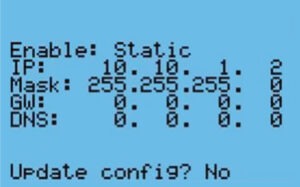
3. The screen will appear like this:
To get the IP Address to stay in the Carel control, complete steps 1-4. Step 3: The screen will appear like this
4. Set the IP address and update config to yes. Cycle power.

Above the display and to the left you’ll see “J10.” Behind that is “J3.” From the factory, a 6-wire cable is wired to J3 for a remote display but if you are using building management system (BMS), you can remove it and wire your BMS there instead. When wiring, make sure you use the + and – connections and not the vterm, as you can damage the port.

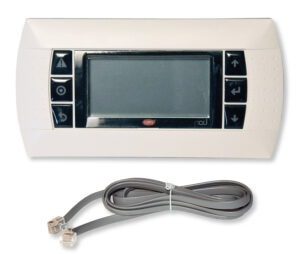
While the Carel RUT includes a standard 5-foot cable, your specific application may require a longer connection. Specifically, these cables utilize a unique internal wiring configuration where two wires are swapped; consequently, standard phone cords will not work with this system.

Although RenewAire does not stock these individual items, you can purchase cables up to 150 feet directly from CarelParts.com. To ensure compatibility, please refer to the specific part numbers listed below:

Carel Part Numbers

Part NumberDescription
S90CONN0026 wire phone cord connector, 2.5 ft
S90CONN0006 wire phone cord connector, 5 ft
S90CONN0016 wire phone cord connector, 10 ft
S90CONN0036 wire phone cord connector, 20 ft
S90CONN0046 wire phone cord connector, 35 ft
S90CONN0056 wire phone cord connector, 50 ft
S90CONN0066 wire phone cord connector, 75 ft
S90CONN0076 wire phone cord connector, 150 ft

The Carel RUT comes with a standard 5-foot cable, but you may need a longer cable for your application. The cord looks like a phone cord but actually has two wires swapped inside so standard phone cords do not work. If so, cables up to 150 feet are available but RenewAire does not carry them. To order visit: https://www.carelparts.com/.

If your installation requires a direct connection to the four-pin J3 connector rather than the standard jack, you must follow a specific wiring sequence. Specifically, connect the six-wire cable to the J3 pins as follows:

  • Blue + White to +Vterm

  • Yellow + Black to G

  • Green to (+)

  • Red to (-)

To start up your RenewAire energy recovery ventilator (ERV), please watch our step-by-step start up video.

In the electrical box, your unit has:

  • a green control board. Make sure the yellow VAR wire is connected to the black COM wire.
  • one 10 pin grey terminal block. Make sure there is a connection between terminals 3 and 4 when variable speed desired.
  • two 8 pin grey terminal blocks. On the terminal block that has the blue factory wire on terminal 1, make sure there is connection between terminals 2 and 3 when variable speed is desired.

If your unit has a Carel controller, please call RenewAire at (608) 221-4499.

The 2021 fault is indicating that the drive has not received an enable signal. The most common reason for this is when the factory installed damper has not achieved its end switch, or the unit has not been provided with an enable.

DN-2 SOUND DATA

Test Conditions 1125 CFM, .75″ ESP

 SOUND POWER BY OCTAVE BAND 
 62.51252505001000200040008000LwLwadB
SUPPLY AIR6562636466615447726957
RETURN AIR6764646359544940716553
CASING7073716564615747777058

DN-3 SOUND DATA

Test Conditions 2250 CFM, 1.0″ ESP

 SOUND POWER BY OCTAVE BAND 
 62.51252505001000200040008000LwLwadB
SUPPLY AIR7066757778716452828069
RETURN AIR7566777168625844807462
CASING7874847676705757878169

DN-5 SOUND DATA

Test Conditions 3375 CFM, 1.25″ ESP

 SOUND POWER BY OCTAVE BAND 
 62.51252505001000200040008000LwLwadB
SUPPLY AIR7470767777747263838157
RETURN AIR7973797668646152847653
CASING8280858077737060898258

Yes, our ERVs are compliant. Here is a link to the website where you can find the specific codes. 

American Recovery and Reinvestment ACT (ARRA) of 2009 

Shipping and Logistic Questions

Log into RenewAire’s CORES online configurator program. Lead times are on the last tab at the top of the website once you are logged in. If you do not have an account with us, please contact our Technical Sales Support (TSS) team for updated lead times.

Orders from our sales channel can be submitted to [email protected]. If you are not sure if you have an account with us, please give us a call at (800) 627-4499. Select option 1 and then option 1 again.

Still have questions?

Please reach out to our Technical Sales Support team. They are HVAC experts, who specialize in energy recovery ventilation. The team will troubleshoot product issues and answer any questions you may have.

Looking for information on indoor air quality?

Visit our indoor air quality (IAQ) page to learn more about the importance of IAQ. There, you can learn about indoor pollutants, the impact of air quality on health and wellness, and which ventilation strategy is right for your home or workplace.